
Whether you are calculating a 15% tip at a restaurant, trying to figure out the final price of a jacket marked 30% off, or evaluating a company's 23% year-over-year revenue growth, percentages are an essential part of our daily lives. While they are a simple mathematical ratio, trying to remember the exact formulas or write Excel formulas on the fly can often lead to confusion.
I remember standing in an electronics store, staring at a product with a "Save 25% Today" sticker. I pulled out my smartphone to find the final price, but found myself hesitating for a moment. Should I multiply the original price by 0.25 and subtract, or simply multiply by 0.75? While the math is straightforward once you know it, the friction of manually computing it can be annoying when you need a fast answer.
In this guide, we will break down the essential percentage calculator formulas and mathematical equations for different real-world scenarios. We will also introduce a high-performance web tool that calculates percentages in 1 second, directly in your browser.
Core Concepts and Math Formulas
The word "percentage" comes from the Latin per centum, which literally translates to "by the hundred." A percentage is simply a way of expressing a fraction or a ratio with a denominator of 100. It is denoted by the symbol %.
The fundamental formula to calculate a percentage is:
Percentage (%) = (Part / Whole) × 100
However, in everyday life and business scenarios, we need to calculate different facets of percentages. The table below outlines the 5 most common percentage calculation scenarios, along with their respective mathematical formulas.
Common Percentage Formula Reference Table
| Scenario | What You Want to Find | Math Formula / Equation | Real-World Example |
|---|---|---|---|
| 1. Basic Percentage | What % of Whole is Part | Percentage = (Part ÷ Whole) × 100 |
What percentage is 150 out of 500? |
| 2. Finding Part of Value | The actual value represented by a % of Whole | Part = Whole × (Percentage ÷ 100) |
Calculating a 15% tip on a $80 bill |
| 3. Inverse Percentage | The Whole value when you know Part and % | Whole = Part ÷ (Percentage ÷ 100) |
Finding original salary if a $500 bonus is 5% of it |
| 4. Percentage Increase | Final value after increasing by a certain % | Final = Original × (1 + Increase ÷ 100) |
Getting an 8% raise on a $50,000 annual income |
| 5. Percentage Decrease | Final value after reducing by a certain % (discount) | Final = Original × (1 - Discount ÷ 100) |
Buying a $120 item with a 30% discount coupon |
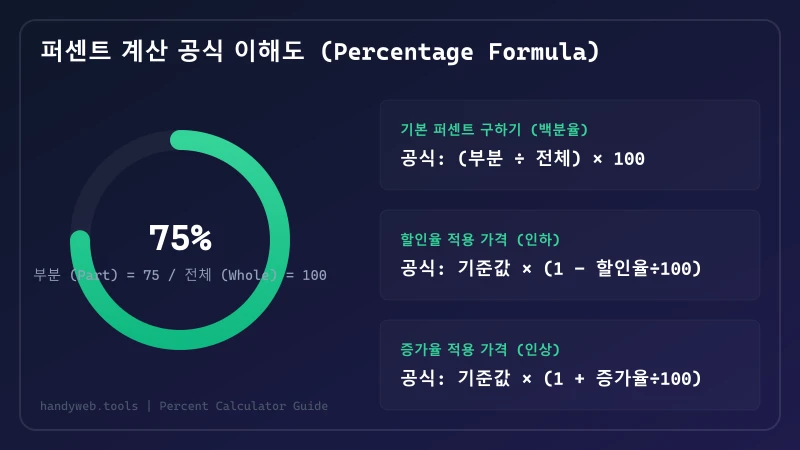
A critical mathematical trap that many people fall into is assuming that percentage changes are symmetrical. For example, if a stock drops by 20% today, you might think it only needs a 20% increase tomorrow to return to its original value. This is mathematically incorrect:
- If a $100 stock drops by 20%, it is worth $80.
- If it increases by 20% tomorrow, that 20% is calculated based on its new value ($80), not the original $100.
- Therefore, the increase is
80 × 0.20 = $16, making the stock worth $96. It actually requires a 25% increase (20 ÷ 80 × 100) to return to the original $100.
Understanding these baseline formulas prevents costly financial miscalculations in business and investments.
Practical Guide with Percent Calculator
While knowing these formulas is great, manually entering formulas into a basic calculator app is tedious and prone to typos.
To solve this, you can use our free, browser-based Percent Calculator tool. It requires no installation, is fully responsive on mobile, and works instantly without sending your data to any external server.
Step-by-Step Guide to Using the Web Calculator
- Open the Tool: Navigate to the Percent Calculator page. Bookmark it on your mobile device for quick access while shopping or in meetings.
- Identify Your Question: Choose the calculator form that matches your query. We provide specialized input boxes for different questions (e.g., "What is X% of Y?", "X is what percent of Y?", "X increased/decreased by Y%").
- Input the Numbers: Type the values into the fields. The calculation happens instantly in real-time as you type.
- Copy the Result: Read the computed value at the bottom. You can use the copy button to clipboard-paste it directly into email drafts or Excel spreadsheets.
Since the tool runs locally in your browser using pure JavaScript, it is completely secure, private, and works even with slow internet connections.
Comparing Percentage Calculation Methods
There are several ways to calculate percentages. The table below compares the web calculator with other common methods to help you choose the best tool for your situation.
Comparison of Percentage Calculation Tools
| Method | Speed | Handling Complex Queries | Accessibility | Best Suited For | Limitations |
|---|---|---|---|---|---|
| Dedicated Web Calculator (Our Tool) |
Instant (Real-time as you type) |
Easy (Pre-defined forms) |
High (Works on any device browser) |
Quick retail shopping, financial calculations, fast estimates | Requires initial browser loading |
| Excel Spreadsheet | Moderate (Must write formulas) |
Excellent (Massive datasets) |
Moderate (Best on desktop computers) |
Business reports, accounting, processing large data lists | Formulas like =A1*B1 can be hard for beginners |
| Google Search Bar | Moderate (Typing search query) |
Moderate (Simple math only) |
High (Requires search app) |
Quick queries when you already have browser open | Relies on search query interpretation syntax |
| Physical Calculator | Slow (Sequential button pressing) |
Difficult (Must know formula order) |
Moderate (Requires physical device) |
Exam environments, areas without smartphones | Easy to make input mistakes; must memorize formulas |
| Mental Math | Varies (Depends on skill) |
Extremely Difficult | Always available | Rough estimation (e.g. 10% or 20% simple tips) | Highly inaccurate for decimals and complex numbers |
For business professionals managing hundreds of rows of data, Excel is the absolute gold standard. However, when you are on the go, in a meeting, or comparing price tags at a local store, pulling out your phone and opening the Percent Calculator is by far the fastest and most convenient method.
Frequently Asked Questions
Q1: Is there a mental math shortcut for calculating a 20% discount?
A: Yes! A 20% discount means you pay 80% of the original price. Instead of calculating the discount amount and subtracting it, simply multiply the original price by 0.8.
- Example: A $50 item with a 20% discount is
50 × 0.8 = $40. - Similarly, for a 15% discount, multiply by 0.85; for a 30% discount, multiply by 0.7.
Q2: How do I calculate the original price before a tax increase? For example, if an item costs $110 including a 10% sales tax, what was the pre-tax price?
A: A common mistake is subtracting 10% of $110 ($11), which results in $99. However, the tax was applied to the original price, not the final price.
The correct inverse formula is:
Original Price = (Final Price / (1 + (Tax Rate ÷ 100)))
Using this, the original price is 110 ÷ 1.1 = $100.
Q3: When calculating growth rates, how do I know which value goes in the denominator?
A: The denominator must always be the starting point or original value (the historical value).
- Example: If your website traffic was 2,000 visitors last month and grew to 3,000 visitors this month, the percentage growth is: Growth Rate = ((3,000 - 2,000) / 2,000) × 100 = 50% Using the current value (3,000) as the denominator would result in an incorrect growth rate of 33.3%.
Conclusion & Actionable Steps
Percentage formulas are easy to understand but easy to mix up in practice. Using a dedicated tool eliminates the risk of human error and saves valuable time during critical business calculations or everyday budgeting.
Try our web tools to simplify your mathematical workflows:
- 🧮 Calculate Instantly: Use our Free Percent Calculator to solve any percentage problem in real-time.
- 📏 Explore Unit Conversions: Check out our Unit Converter Practical Guide to easily convert dimensions, weights, and metrics.
- 💳 Finance and Loans: For calculating compound interest or managing loan schedules, visit our Loan Repayment Calculator Guide.